Keep your workflow. Let ADAM Data AI reconcile invoices, delivery notes and orders.

Keep using the tools you already know to share files, photos, and PDFs. ADAM Data AI reads the chaos, builds a clean operational database, matches related documents and alerts your teams when something is missing or wrong.

ADAM plugs into existing work without replacing it

Definition

What is ADAM Data AI?

ADAM Data AI is document reconciliation software. It captures operational documents such as invoices, purchase orders and delivery notes from the channels a team already uses, including email, WhatsApp, PDFs and spreadsheets, then extracts the data, matches related documents against each other, and flags anything missing, duplicated or wrong without changing the team's existing workflow.

Document types, matching rules and tolerances are configured per customer rather than shipped as a fixed taxonomy, which is why the same engine runs for fuel and station networks, telecom carriers, workshops and distributors. Where a workflow needs more than configuration can express, it is built as its own module alongside the shared engine. ADAM is built by AdamAI AG, a Swiss company, and runs across industries and countries.

  • Invoices
  • Purchase orders
  • Delivery notes

Watch ADAM reconcile documents end to end.

The video is the fastest walkthrough of the product: setup, extraction, checker review, matching and handoff in one continuous run.

ADAM plugs into the work, then closes the gaps.

The true power of ADAM lies in its frictionless adoption: ADAM ingests your current workflow exactly as it is.

Instead of forcing your company to rebuild its processes around a new tool, ADAM Data AI works invisibly within the systems you already use. It seamlessly captures your current flow, structures and reconciles the data, and pushes clean decisions forward, delivering immediate clarity without a single operational detour.

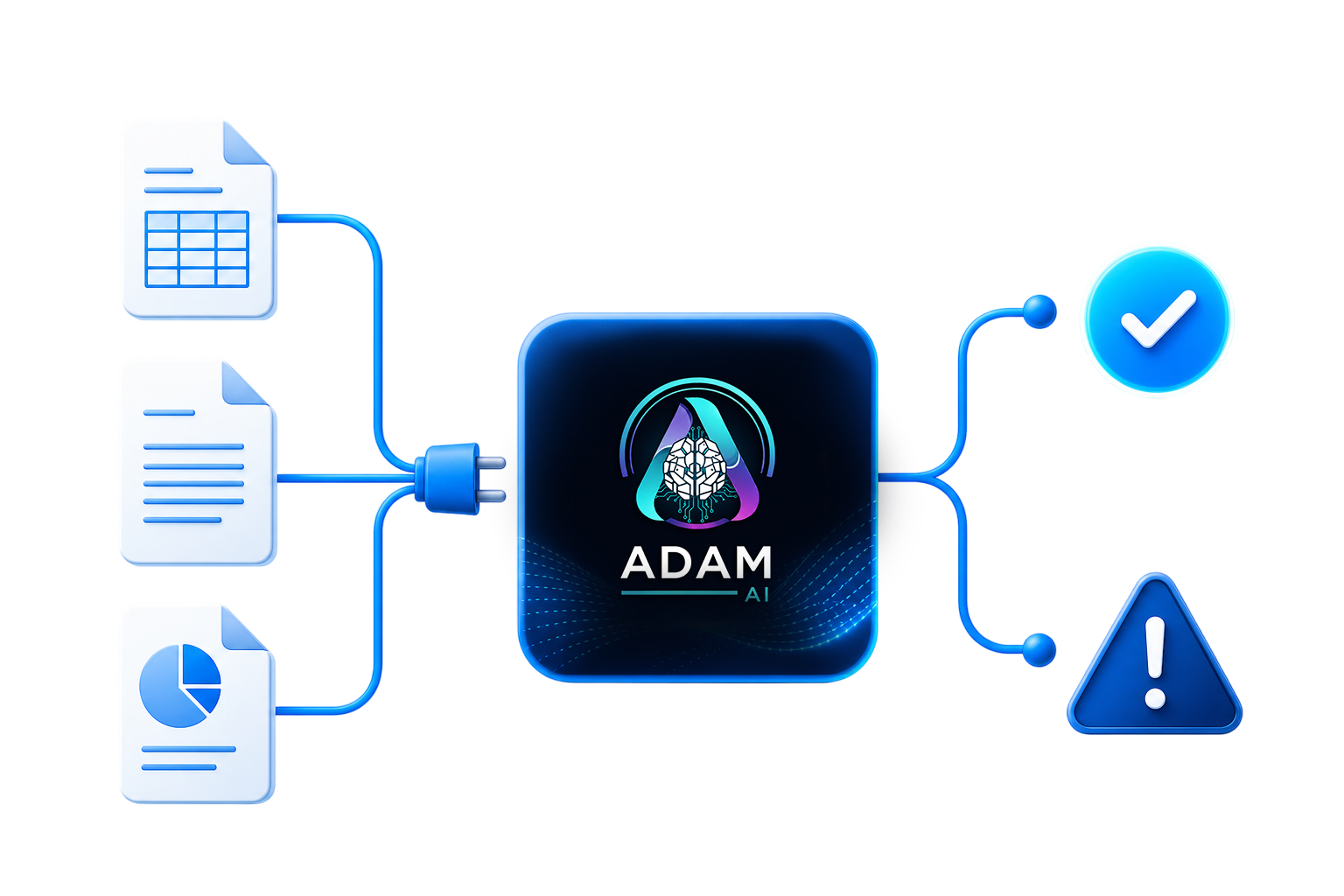
ADAM plugs into existing workflows, reconciles documents and sends clean decisions to legacy systems
01

Capture documents from email, WhatsApp and PDFs

Teams keep sending files through mail, WhatsApp, PDFs, photos and spreadsheets.

02

Extract and audit the data

ADAM structures fields, keeps the source evidence and marks clean versus suspicious data.

03

Match invoices to delivery notes and orders

Invoices, orders, delivery notes and inventory records are matched automatically.

04

Push clean data to SAP, Oracle or spreadsheets

Clean results can feed dashboards, spreadsheets, SAP, Oracle or a custom workflow.

What your team actually gets.

ADAM reduces bureaucratic friction: less manual entry, earlier missing-document alerts, cleaner audit trails and a bridge from legacy systems into AI-powered operations.

ADAM feature infographic showing no workflow change, document reconciliation, structured database, error detection and legacy bridge

The visible change is not another inbox.

ADAM sits between everyday documents and the systems that need trustworthy rows, so the work feels cleaner without forcing the team into a new portal habit.

No workflow change

People keep forwarding files, sending photos and working in spreadsheets. ADAM sits beside the existing flow instead of replacing it.

Document reconciliation

Invoices, purchase orders, delivery notes and inventory records are matched automatically so missing or conflicting documents surface early.

Structured database

Unstructured PDFs and images become legible rows that operations, accounting and management can actually use.

Error and typo detection

ADAM audits extracted data, flags suspicious values and helps catch human or AI mistakes before they reach reporting.

Legacy bridge

Clean data can flow into dashboards, Excel, Google Sheets, inventory views, SAP, Oracle or a custom operational workflow.

Frequently asked questions

What does ADAM Data AI do?

ADAM Data AI captures operational documents such as invoices, purchase orders and delivery notes from email, WhatsApp, PDFs and spreadsheets, structures them into clean data, matches the related documents together, and flags anything missing, duplicated or wrong. Document types and matching rules are configured per customer rather than fixed, so the same engine serves fuel and station networks, telecom carriers, workshops and distributors. It works alongside the tools a team already uses, so teams get reconciled records without changing how they work.

How is ADAM different from OCR or generic AP automation?

OCR and generic AP automation mostly read a single invoice and route it for approval. ADAM Data AI goes further: it matches each invoice against its purchase order and delivery note and reports the row-level differences, so missing loads, price drift and duplicates surface early. The matching runs on configurable, deterministic rules, so every decision is auditable and repeatable rather than a black-box guess.

Do we have to change our current workflow or software to use ADAM?

No. Teams keep sending documents the way they already do, by email, WhatsApp, PDF, photo or spreadsheet, and ADAM works beside that flow instead of replacing it. There is no new portal to log into and no ERP migration required.

What documents can ADAM reconcile?

ADAM reconciles the operational documents that move between a company and its partners, including invoices, purchase orders, delivery notes, pickup slips and inventory records. It reads them from unstructured sources like PDFs, scans and photos and turns them into structured rows that operations, accounting and management can use.

How does ADAM match delivery notes to invoices?

ADAM pairs each line on a delivery note with the matching line on the invoice and the order, using the fields that identify a transaction such as date, product, quantity and location. When a line is missing, duplicated, or the values do not agree, ADAM flags it for review with the original document kept as evidence. Because the rules are configured per customer, the matching reflects how that business actually works.

Can ADAM send data into SAP, Oracle or spreadsheets?

Yes. Once documents are reconciled, ADAM can push the clean data into dashboards, Excel, Google Sheets, SAP, Oracle or a custom workflow. This lets ADAM act as a bridge from legacy paper and PDF documents into the structured systems a team already reports from.

Where does ADAM operate, and which languages does it handle?

ADAM Data AI is a Swiss company, and its engine is configured per customer rather than for a fixed market, so it runs for operators across industries and countries. It handles English and German documents today and adapts to each customer's document formats and multi-site partners that submit paperwork across several locations.

Can I try ADAM before committing?

Yes. You can try ADAM live in the interactive demo: forward a sample invoice or delivery note to the demo mailbox, or send it over WhatsApp, and watch ADAM extract, match and flag the documents in real time. It is the fastest way to see how ADAM would handle your own paperwork before any commitment.

Can ADAM pull data from our existing systems?

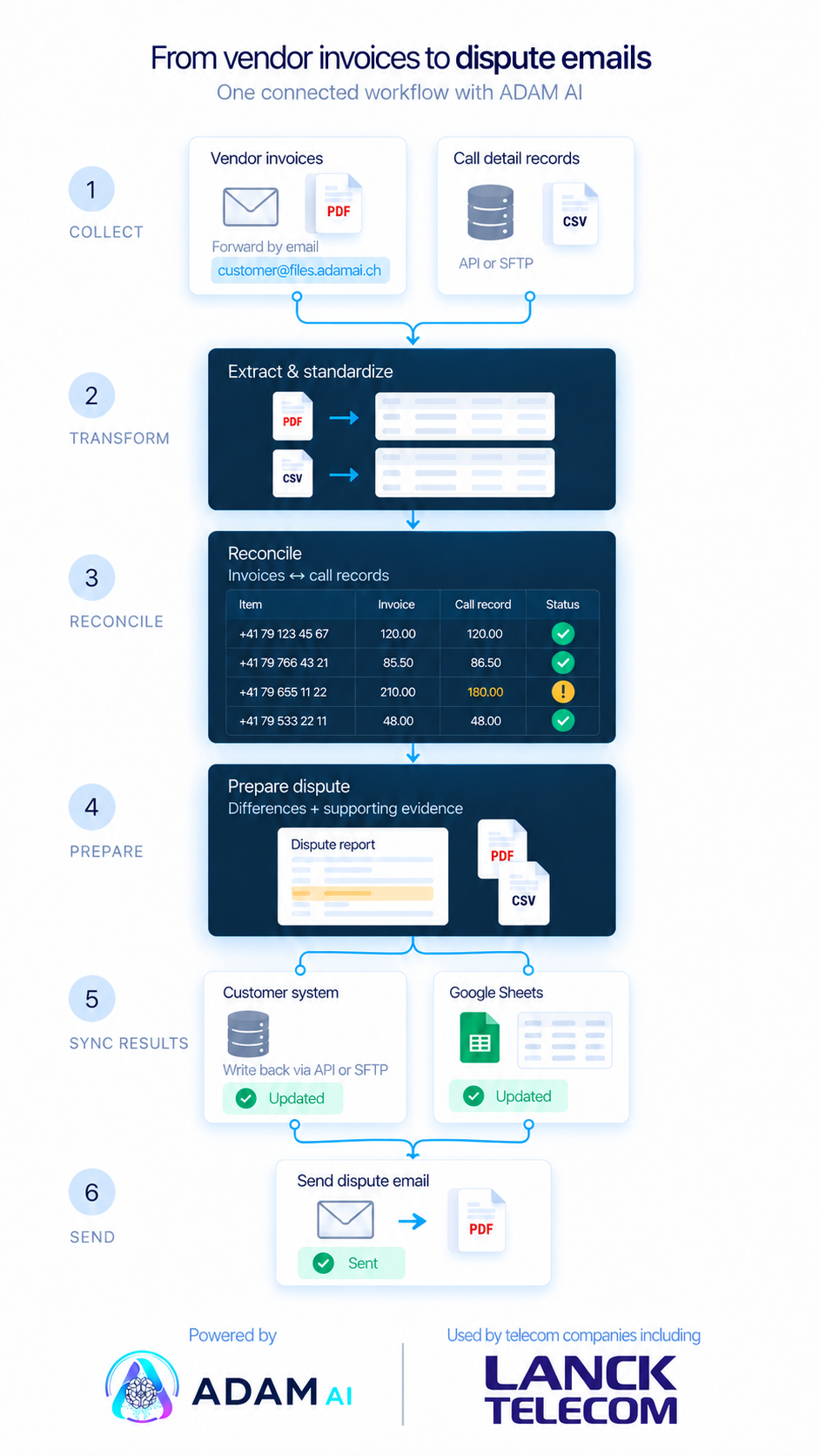
Yes. Alongside email and messaging, ADAM can collect data from a secure file drop you already publish to, a shared cloud folder, or a scheduled API pull from a platform you already run. That last one matters most: an internal record from your own billing or ERP system becomes the expected figure a supplier invoice is tested against, so the check uses your numbers rather than the vendor's. Each API connection is built for the specific system rather than chosen from a catalogue of connectors, and ADAM can write a finished record back the same way once a person has approved it.

Bring ADAM into your document flow.

Start with the channels you already use. We map the documents, define the modules and connect the outputs to your existing team.

Get in touch

ADAM Data AI

Michael Knobel, CEO

michael@adamai.ch